
Strategies: Guide
The strategies section helps you find Ziggs indicator settings that have already been tested on historical data and use them as a basis for your own trading. These are not “perfect” parameters — a careful trader can always fine-tune them manually to better match the market.
Strategy signals are delivered to the same Telegram bot as alerts. If you have already linked Telegram in the “Alerts” section, there is nothing extra you need to configure for strategies.
1. Finding Strategies
Open the “Strategies” section. At the top you’ll see the search filter, and below it — the table of matching strategies.
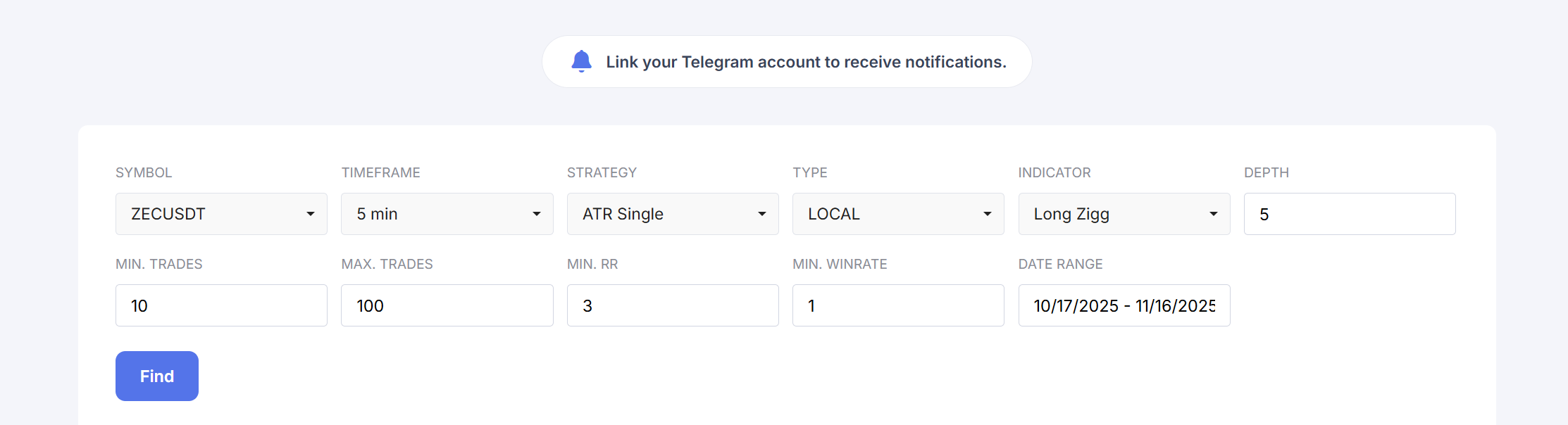
Filter Fields
- Symbol — trading pair, for example BTCUSDT.
- Timeframe — strategy timeframe (5 min, 1h, etc.).
-
Strategy — strategy type:
- ATR Single — strategy with a single take-profit;
- ATR Two Target — strategy with two take-profits: when the first target is hit, 50% of the position is closed, the stop for the remaining part is moved to breakeven, and the second target is the final exit.
-
Type — which signal sources are used:
- Local — only local indicators for the selected pair;
- Global — strategies based only on global indicators (Global 1 / Global 2 depending on the chosen indicator);
- Local + Global — both the local and global indicator are used in the strategy at the same Depth.
- Indicator — indicator used in the strategy (for example, Long Zigg).
- Depth — order book depth for the indicator (in percent).
- Min. Trades — minimum number of trades for the selected period (filters out strategies that trade too rarely).
- Max. Trades — maximum number of trades (lets you limit overly frequent systems).
- Min. RR — minimum risk/reward ratio required for the strategy to appear in the list.
- Min. Winrate — minimum win rate in percent.
- Date Range — time period used for statistics.
Adjust the filter and click Find — the table below will show strategies that match your conditions.
2. Strategies Table
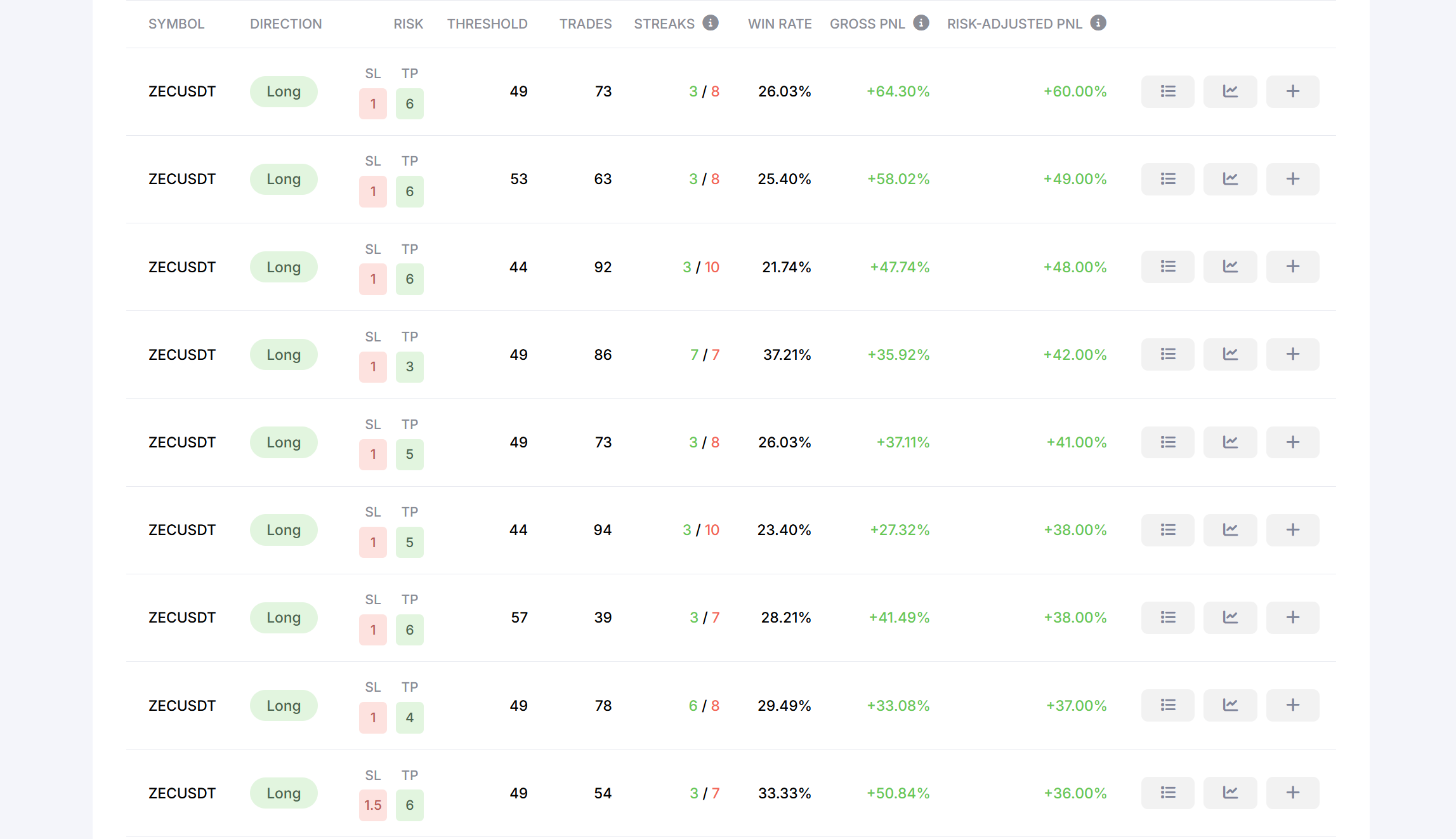
Table Columns
- Symbol — the pair the strategy is built for.
- Direction — trade direction: Long or Short.
- Risk — base stop-loss and take-profit settings (for example, SL 1 / TP 5 or SL 1 / TP 5 / TP 10).
- Threshold — indicator threshold at which trades are opened.
- Trades — number of trades in the selected period.
- Streaks — maximum winning and losing streaks (win / loss).
- Win Rate — percentage of profitable trades.
- Gross PnL — the “raw” result of the strategy for the period: without applying a fixed risk per trade or position-sizing rules.
- Risk-Adjusted PnL — result under the assumption that each trade risked a fixed 1% of the account.
-
On the right you’ll find three action buttons:
- list icon — view the strategy’s trades as a table;
- chart icon — view trade history on the price chart;
- “+” icon — subscribe to the strategy’s signals.
3. Viewing Trades and Periods
Click the list icon to open the strategy’s trades as a table, or the chart icon to see entries and exits directly on the price chart.
You can change the period and recalculate the stats — this helps you see how the strategy behaves in different market phases.
4. Subscribing to a Strategy and Risk
To receive real-time signals from a strategy:
- Find the strategy in the list.
- Click the “+” icon.
The strategy will appear in the “My Strategies” section, and new entry points will start arriving to your Telegram bot.
Each signal includes a position size calculated for 1% and 5% risk per trade. We recommend allocating a separate amount specifically for trading Ziggs strategies and treating it as your “working” account. For example, you might start with $100 as the working amount and keep another $50 as a reserve to comfortably sit through losing streaks. Once you get used to how the strategies behave and how drawdowns feel, you can gradually increase the working amount.
5. My Strategies
In the “My Strategies” section you can:
- see all your active subscriptions;
- pause a strategy;
- completely unsubscribe from its signals.
6. Important Risk Notes
- Strategies are based on historical data — this does not guarantee the same results in the future.
- Do not use signals without risk management: decide in advance what percentage of your account you are willing to risk per trade.
- Look not only at profit, but also at the number of trades, the length of losing streaks, and how well the strategy’s style matches your own.
Ziggs strategies are a tool for finding ideas and shaping your own system, not an automatic source of profit. Use them as a foundation that you complement with your experience and risk management.