
Alerts: Guide
Alerts let you avoid keeping the chart open 24/7: Ziggs monitors the selected conditions for you and sends a signal when they are met.
If you have already gone through “Quick Start”, you’ve seen a basic example of an alert based on a global indicator. In this guide we’ll go a bit deeper and create an alert for ETHUSDT that uses both a local and a global indicator.
1. Connecting the Telegram Bot
All alerts from Ziggs are delivered via a Telegram bot. Without connecting the bot, alerts will be created but you won’t see their triggers.
- Go to the “Alerts” section.
- If the bot is not connected yet, you’ll see a banner at the top of the page with a link to the Telegram bot.
- Click the link, open the bot and press Start.
After that the banner disappears and all new triggers start arriving in Telegram.

2. Creating a New Alert
The alert creation form will open.
3. General Settings: Name
At the top you only set the alert name. This is important because the Telegram bot sends exactly this name, without decoding the internal conditions.
We recommend short and clear names, for example:
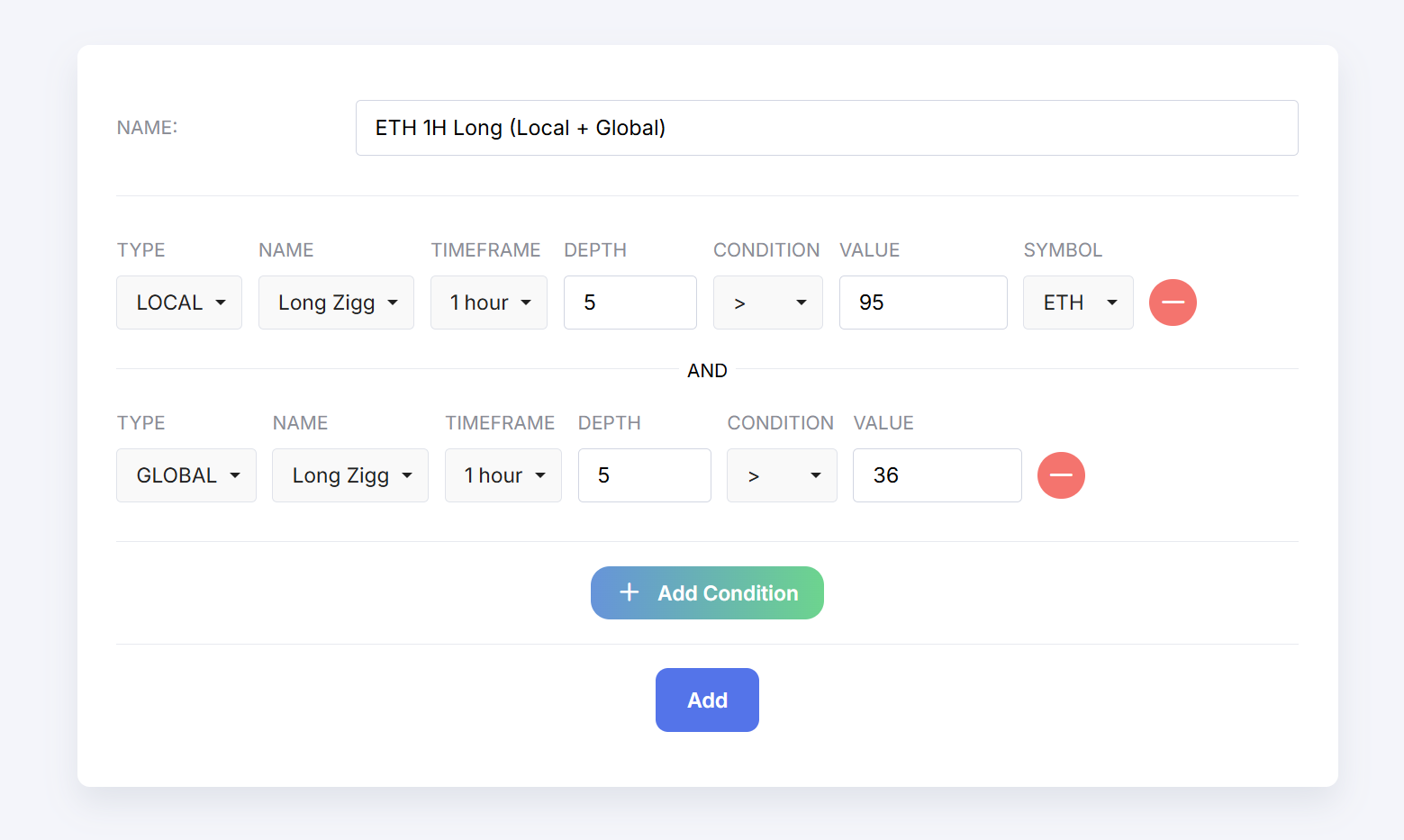
- ETH 1H Long (Local + Global),
- Market Long Global,
- BTC 4H Short Signal.
A good name saves time: from the Telegram notification alone you immediately understand which signal has fired.
4. Condition Based on the Local Indicator
First, let’s add a condition based on [Local] Long Zigg for ETHUSDT.
- Click “Add Condition”.
- In the type field select Local.
- In the indicator field select Long Zigg.
- Set the instrument to ETHUSDT and timeframe to 1 hour (if they are set at condition level).
- Depth: 5%.
- Condition:
- operator — >,
- value — 95.
This filter means: “the alert is valid when local Long Zigg for ETHUSDT on 1H with 5% depth rises above 95”.
5. Condition Based on the Global Indicator
Now add a second condition for [Global] Long Zigg. The alert will only fire when both conditions are met at the same time.
- Click “Add Condition” again.
- Select type Global (Global 1 or Global 2, depending on which one you use).
- Indicator: Long Zigg.
- Timeframe: 1 hour.
- Depth: 5%.
- Condition:
- operator — >,
- value — 36.
Now the alert will only trigger when:
- local Long Zigg for ETHUSDT on 1H > 95 at 5% depth; and
- global Long Zigg on 1H > 36 at 5% depth.
6. Saving and Managing Alerts
- Check the name and the list of conditions.
- Click “Save”.
In the alerts list you can:
- enable or disable an alert with a toggle,
- edit its conditions,
- delete alerts that are no longer needed.
7. What Alerts Look Like in Telegram
When all conditions are met, Ziggs sends a short message to Telegram with the alert name and service information about the trigger. That’s why it is important to choose a meaningful name: it is your main hint about what just happened on the market.
What to Do Next
Try experimenting:
- create a separate alert based only on a global indicator to track the market background;
- make stricter combinations of conditions for entries;
- copy successful ETHUSDT settings to other pairs.
In the indicators and strategies sections you’ll find ideas on how to integrate alerts into a full trading system.